Kedge
Two-way Nextcloud sync built around one promise: deleting a file on your phone never deletes it on the server.


Overview
Kedge is a two-way file sync client for Nextcloud and generic WebDAV, built around a single guarantee:
**Removing a file from your phone or tablet never removes it from the server.**
That is not a preference, it is the architecture. The sync engine exposes no remote delete at all under its default policy, so the worst outcome of any bug is wasted bandwidth or a duplicate file — never data loss. A test sweeps all twenty-six reachable combinations of local state, remote state and journal state, and asserts that a remote deletion can never be emitted.
Every decision compares three things: the file on your device, the file on the server, and the journal row describing the last state both agreed on. Two-state comparison cannot tell "created here" from "deleted there", so Kedge never does it. Contents are never merged: divergence produces a conflict copy and both versions survive.
It talks to your server and nobody else's. There is no Kedge account, no Kedge cloud, and no telemetry.
Features
No remote deletion, ever
Under the default policy the client cannot issue one. The API for it does not exist, so no bug can reach it.
Twenty-six states, all swept
A test walks every reachable combination of device, server and journal state and asserts none of them produces a remote deletion.
Three-state reconciliation
Device, server and the journal row describing the last agreed state, compared together — so a creation is never mistaken for a deletion.
Conflicts keep both versions
Divergence produces a named conflicted copy with the date and time. No merge, no newest-wins, no silent resolution.
Several folder pairs
Each mapping one local directory to one remote path, with its own policy.
Several accounts
More than one server attached at a time, so work and home do not have to share.
Dry run on any pair
See exactly what a pass would do before it does it. Available on every pair, not just the first time.
Mirror mode, if you want it
Opt-in per pair, and even then a local deletion becomes a move to the Nextcloud trashbin — never a hard delete — so the web interface can still recover it.
Local deletes go to a trash folder
A file removed on the server leaves your device by way of local trash, not straight to nothing.
The journal is written after the fact
Only a transfer that succeeded is recorded, so an interrupted pass repeats work rather than lying about what happened.
Any folder you choose
Not confined to one app-private directory, which is what makes the official client's two-way mode unusable for real work.
Every transfer listed
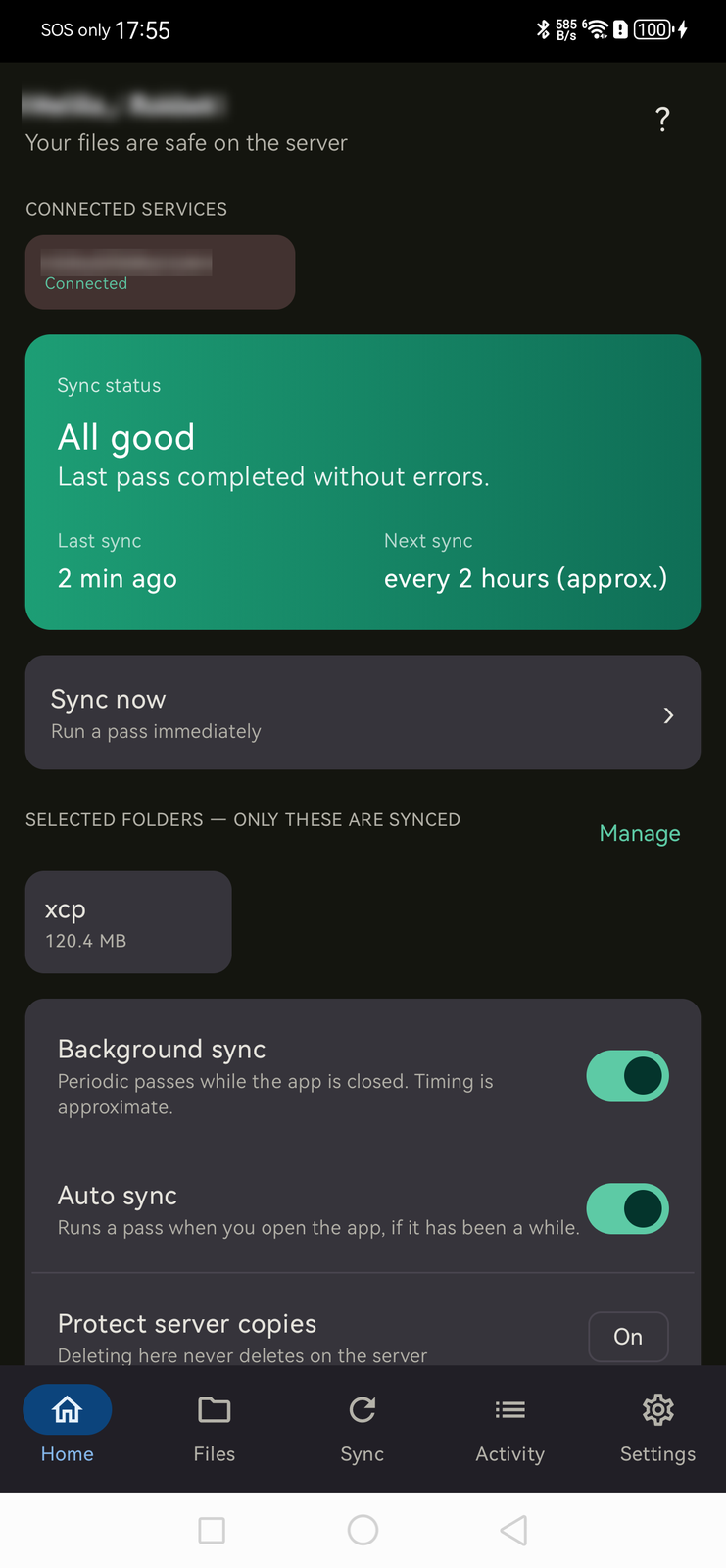
Including the ones that failed, with the size and when — rather than a status light that says \u201call good\u201d and nothing else.
A schedule you set
Fifteen minutes to daily, plus a sync-now button, and background passes within the limits Android actually permits.
Your server, directly
Nextcloud or generic WebDAV. No account with us, no cloud of ours, and no telemetry.
Screenshots
Video demo
Kedge — every menu, on a real phone
What's included
- Android build (arm64, armv7, x86 and x86_64)
- Lifetime licence for three devices
- Every future 0.x and 1.x update
- Nextcloud and generic WebDAV support
- Email support
System requirements
Android
- Operating system
- Android 8.0 (API 26) or later
- Processor
- arm64-v8a, armeabi-v7a, x86 or x86_64
- Disk space
- 80 MB plus room for the files you sync
Needs a Nextcloud or WebDAV server you control.
iOS
- Operating system
- iOS 16.0 or later
- Processor
- Apple Silicon
The iOS core has been ported; the shipping build today is Android.
Changelog
-
Version 0.1.0
New
- Three-state reconciliation engine with the no-remote-delete guarantee
- WebDAV client: PROPFIND, GET, chunked PUT and MKCOL
- Room journal recording the last agreed state of every path
- Scheduled background sync
- Per-folder selection
Improved
- iOS core port and a security review ahead of the store submission
Reviews
No reviews yet. Yours would be the first.
Log in to write a review.
FAQ
If I delete a photo on my phone, does it disappear from the server?
No. That is the entire premise of the app. Under the default policy the client has no way to issue a remote deletion; the path is simply marked released and is not downloaded again.
What happens if the same file changes in both places?
You get a conflict copy and both versions survive. Kedge never merges file contents.
Does it need an account with you?
No. It talks to your Nextcloud or WebDAV server directly. There is no Kedge cloud and no telemetry.
Why not just use the official Nextcloud client?
Its two-way sync is confined to one app-private directory because of a Play Store permission restriction, which makes it unusable for an arbitrary folder. Kedge is distributed outside the store, so it does not have that constraint.
What if a sync is interrupted?
The journal is only written after a transfer succeeds, so the next pass repeats the work. It will never record a state that did not happen.
Can I sync more than one folder, or more than one server?
Yes to both. Each folder pair maps one local directory to one remote path and carries its own policy, and more than one account can be attached at a time.
Can I see what a sync would do before it does it?
Yes — dry run is available on any pair. It reports the decisions it would make and changes nothing.
What if I actually do want deletions to reach the server?
Mirror mode, which is opt-in per folder pair. Even then a deletion becomes a move to the Nextcloud trashbin rather than a hard delete, so you can still recover it from the web interface. The default policy remains that it cannot happen at all.
Does it do end-to-end encryption?
No. Nextcloud's own end-to-end encryption is a separate system and interoperating with it is a project of its own. Your transfers are protected by HTTPS to your server.
Does it replace photo auto-upload?
No, and it is not trying to. The official Nextcloud client already does that well — run both.