Easy Copy Deluxe
Prepare a copy job once. Push one button. See exactly what happened.
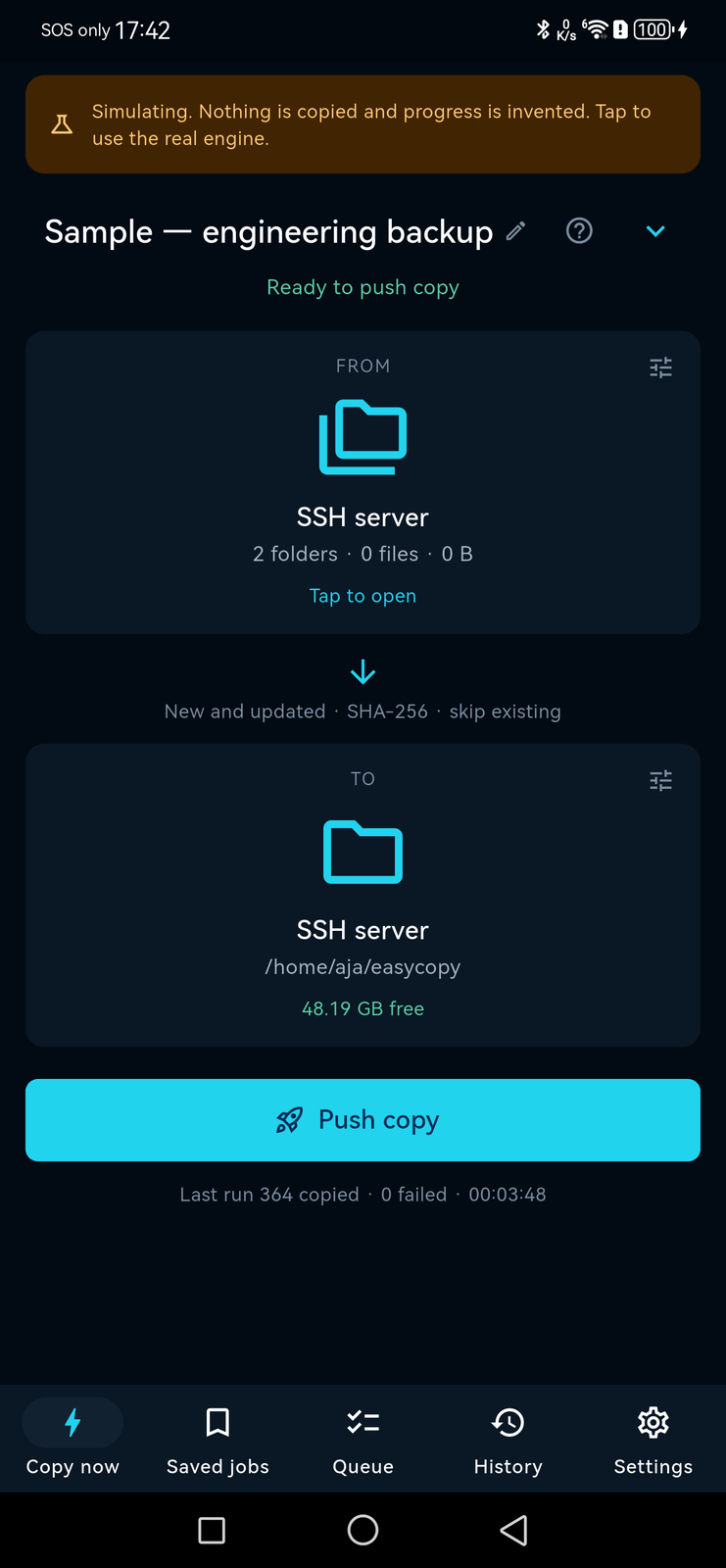


Overview
Easy Copy Deluxe moves files between servers with one deliberate push.
Set a job up once — where files come from, where they go, what to do about conflicts, and how to verify them — and after that a copy is one button.
You always know what will copy, where it will go, and what happened. A confirmation screen tells you what is about to happen, including how much space the destination has left. While it runs you get percentage, bytes, speed, time remaining, files, folders, retries, verification, and the state of both volumes. Afterwards you get every file that did not arrive, with the reason and what to do about it.
Copy is the default; nothing is overwritten silently. Credentials live in the iOS Keychain or the Android Keystore, never in a job file and never in a log. Certificate validation cannot be disabled. An unknown SSH host key is never trusted automatically, and a host key that has changed stops the connection.
The honest framing: push the copy and watch it. Phones do not grant background time for long transfers over SMB or SFTP, so a large copy needs the app open. This app does not promise unattended overnight backups, because the platform will not keep that promise.
No account. No analytics. No servers of ours — your files go directly from your source to your destination.
Features
Prepared jobs
Pick the folders once, reuse them forever. Switch between jobs from the same screen.
One confirmation screen
What is about to happen before it happens: files, folders, total size, and how much room is left at the destination.
Live detail while it runs
Percentage, bytes, speed, time remaining, files, folders, retries, verification and both volumes.
Every failure, with a reason
The files that did not arrive and what to do about each one, rather than a count.
SHA-256 verification
Know a copy is intact rather than assuming. Size and timestamp, or none, if you prefer speed.
Copy modes
Everything selected, only new files, new and updated, verify only, or compare only without moving anything.
Conflicts are decided, never defaulted
Skip existing, replace if newer, keep both, or decide per file — with keep-all and replace-all for the common case. The engine refuses a plan holding an undecided overwrite.
Resumes interruptions
Picks up an interrupted file wherever both ends support it, in every copy mode.
Parallel lanes and retries
Several files in flight at once and a retry count per file, both yours to set.
A queue
Line up jobs and let them run in turn rather than watching each one finish.
An immutable run record
Every run kept, so \u201cwhat happened last Tuesday\u201d has an answer.
Credentials in the Keychain
iOS Keychain or Android Keystore. Never in a job file, never in a log.
Host keys are never trusted silently
An unknown SSH host key stops the connection, and TLS verification cannot be switched off.
Tells you when it finishes
A notification on completion, and always on a failure or a warning.
Trial upgrades in place
The full build installs over the trial as an ordinary update. Saved jobs, connections, pinned host keys and run history all survive.
No account, no analytics
Files go directly from your source to your destination. There is no server of ours in the path.
Screenshots
Video demo
A real copy job, start to finish
Easy Copy Deluxe — every menu, on a real phone
What's included
- Android build (arm64)
- Lifetime licence for three devices
- Every future 0.x and 1.x update
- SMB, SFTP, WebDAV, S3 and OneDrive connectors
- Email support
System requirements
Android
- Operating system
- Android 7.0 (API 24) or later
- Processor
- arm64-v8a
- Disk space
- 60 MB
Long transfers need the app open — Android does not grant background time for them.
iOS
- Operating system
- iOS 13.0 or later
- Processor
- Apple A-series
- Disk space
- 60 MB
iOS build in preparation; the Android build is what ships today.
Changelog
-
Version 0.1.0
New
- Prepared copy jobs with a one-button push
- SMB, SFTP, WebDAV and Nextcloud, S3 and S3-compatible, OneDrive and SharePoint, and on-device storage
- SHA-256 verification of every copied file
- Live transfer detail: speed, ETA, retries, and both volumes
- A failure list that gives the reason for each file
Improved
- Credentials moved to the Keychain and Keystore, never to a job file
Reviews
No reviews yet. Yours would be the first.
Log in to write a review.
FAQ
Can it run in the background overnight?
No, and no app on a phone honestly can for a large SMB or SFTP transfer. Phones do not grant background time for them. Push the copy and watch it; the app tells you how long it has left.
Where are my server passwords kept?
In the iOS Keychain or the Android Keystore. They are never written into a job file and never written into a log.
What happens if a file already exists at the destination?
Whatever you chose for that job. Copy is the default and nothing is overwritten silently — a conflict is skipped and reported rather than resolved on your behalf.
Does anything go through your servers?
No. Files go directly from your source to your destination. There is no account, no analytics, and no server of ours in the path.
Which protocols does it speak?
SMB and Windows shares, SFTP over SSH, WebDAV and Nextcloud, Amazon S3 and S3-compatible storage including MinIO, Backblaze B2 and Wasabi, OneDrive and SharePoint, and files on the device itself.
Is SMB encrypted?
No, and it is important you know that. The SMB connector speaks SMB 2.1, which is signed but not encrypted, so those bytes cross your network in the clear. The app says so on the confirmation screen rather than leaving you to find out. SFTP, WebDAV over HTTPS and S3 over HTTPS are all encrypted in transit; SMB is the exception.
Does OneDrive work out of the box?
Not quite. The Microsoft device-code sign-in is implemented, but it needs an Azure application client ID entered in the app — none is shipped — and it has not been tested against a real tenant. Treat it as available to somebody willing to register an application, not as a turnkey connector.
What is the difference between the trial and the full version?
They are one codebase built two ways, with the same application id and signing key. The full build installs straight over the trial as an ordinary update, and everything you had set up — jobs, connections, host key pins, history — is still there. There is no licence file to lose and nothing to activate.
Can I compare two folders without copying anything?
Yes. Compare only reports the differences and moves nothing; verify only checks what is already at the destination against the source.